
Write and preview markdown documents in your browser with a super fast, user-friendly editor that supports cloud sync and multiple export formats.
Screenshots

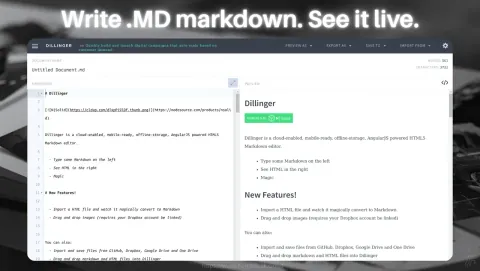
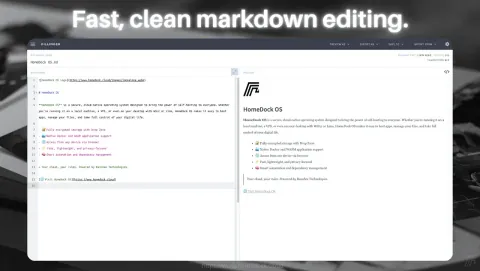
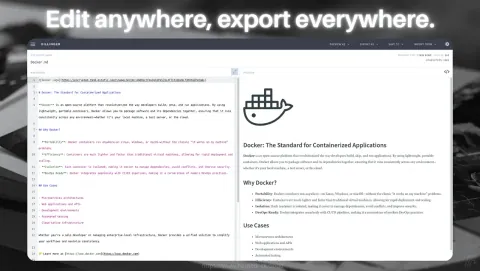
About DillingerMarkdown Editor App (Files and Productivity)
Dillinger is no longer available on the HomeDock OS App Store due to deprecation.
Dillinger may have been affected due to:
- Development discontinued by the original software creator
- Maintenance discontinued by the upstream maintainers
- Known security vulnerabilities without active patches
- Any other critical reason not listed here
Last image provided by LinuxServer
Dillinger is a sleek and intuitive online markdown editor, perfect for creating and exporting formatted documents. With its simple interface and rich export options, Dillinger is ideal for developers, writers, and content creators who value efficiency.
It supports live preview, cloud syncing, and export to multiple formats like HTML and PDF. Whether you’re drafting notes or publishing technical content, this flexible editor helps streamline your workflow while keeping your writing organized and accessible.
Dillinger Key Features:
- • Real-Time Preview: See your markdown render instantly as you type.
- • Export Options: Save documents as HTML, PDF, or markdown files.
- • Cloud Integration: Sync with Dropbox, GitHub, and other services.
- • User-Friendly: Designed for quick and hassle-free markdown editing.
- • Open-Source: Backed by a robust developer community.
Ask AI about Dillinger
Get a quick explanation of what it does and how people use it.
Discover more apps
 FirefoxFast, private web browser for all devices.Get
 JDownloader 2Simplify and automate your download tasks.Get
 Open VSCodeCloud-based code editor for developers.Get
 FacturaScriptsPowerful invoicing and accounting software.Get
 ChromiumBrowser powering modern web applications.Get
 FileZillaRobust FTP client for file transfers.Get
 Disavow GeneratorThe fastest way to generate Google Disavow files.Get
 PlanchetteAI-powered spirit board for interactive conversations.Get
 OperaFeature-rich web browser with VPN support.Get
 SonarrAutomate TV show downloads with torrent.Get
 NGINXHigh-performance web server and reverse proxy.Get
 CodeServerRun Visual Studio Code on your server.Get
 GravFlat-file CMS for lightweight websites.Get
 ProjectSendShare and manage files securely with clients.Get
 WebCordElectron-based Discord client for desktop users.Get
 GrocySelf-hosted groceries and household management.Get
 MeTubeDownload videos and manage local media.Get
 NavidromeStream your music library from anywhere.Get
 AudacityEdit and record audio with professional tools.Get
 GhostInkWrite invisible secret messages inside emojis.Get
 GitHub DesktopVersion control with GitHub's desktop client.Get
 KavitaSelf-hosted reading server for comics and books.Get
 The AtlasA whole universe simulation, on your pocket.Get
 VSCodiumFree, open-source Visual Studio Code alternative.Get
 Minecraft ServerHost your own Minecraft worlds for multiplayer fun.Get
 LycheePhoto management with sleek interface.Get
 EmbyPersonal media server for streaming content.Get
 darktablePhoto and image editor for professionals.Get
 AltusWhatsApp client with multiple account support.Get
 ownCloudFile storage and synchronization solution.Get
 WireGuard VPNFast, secure, and modern VPN protocol solution.Get
© The trademarks and copyrights of these apps are the property of their respective developers. HomeDock OS is not affiliated with the developers of these applications unless explicitly stated.