Hiting Claude Code Limits? Offload Boring Tasks to Gemini
Borderline is an open-source Claude Code plugin that offloads boring, repetitive tasks to Gemini Antigravity CLI to save Claude tokens, reviewing each result
 Néstor González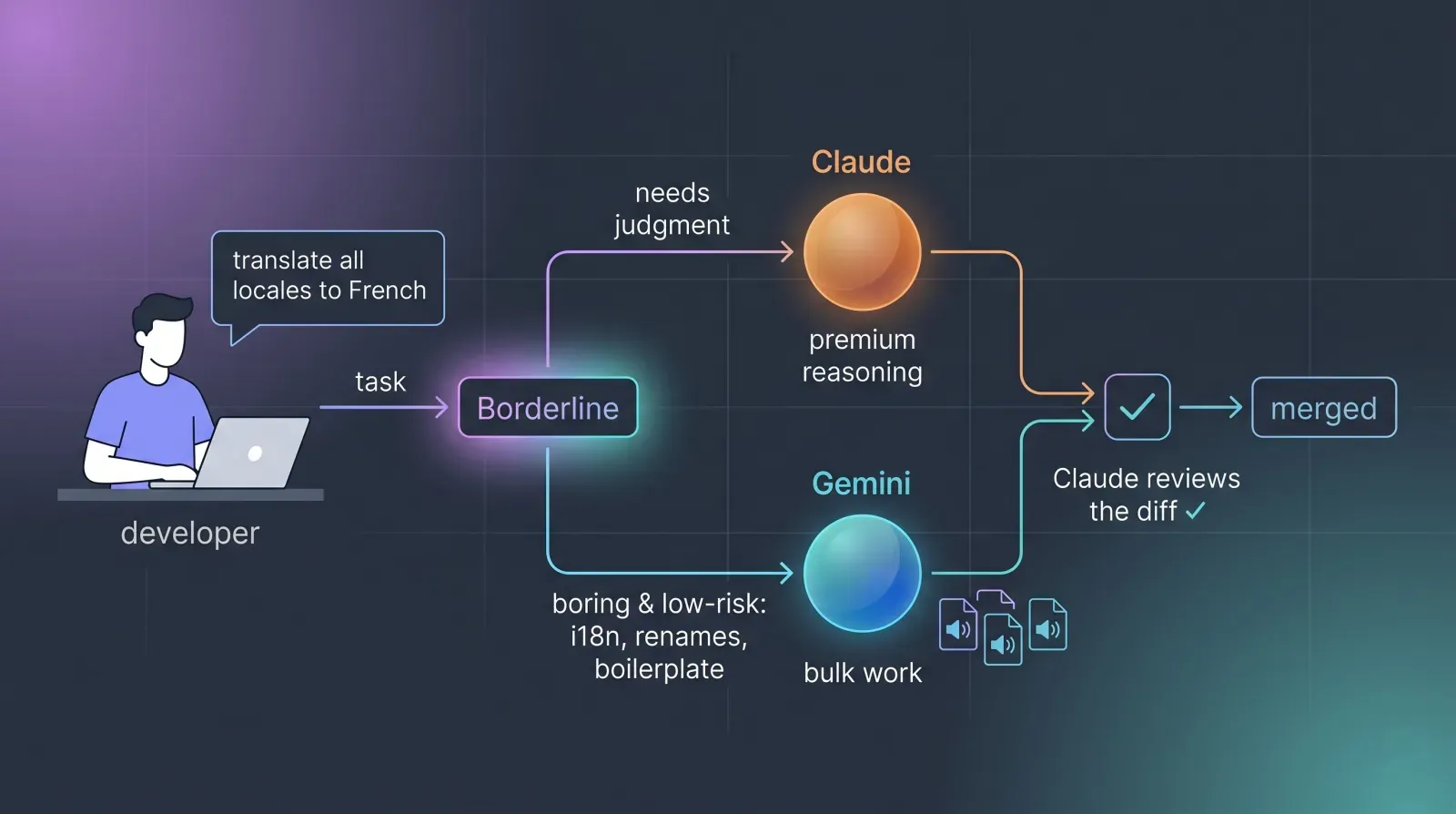
Here’s a problem every developer who works with AI agents runs into eventually: not every task deserves your best model. Translating 142 locale keys into German doesn’t require reasoning. Swapping a background color from #3B82F6 to something 20% darker doesn’t require architecture. Renaming the same variable across 40 files isn’t a judgment call. It’s just work, and it’s the kind of monotonous, mechanical work that’s expensive to throw at a premium model when something cheaper does it just as reliably.
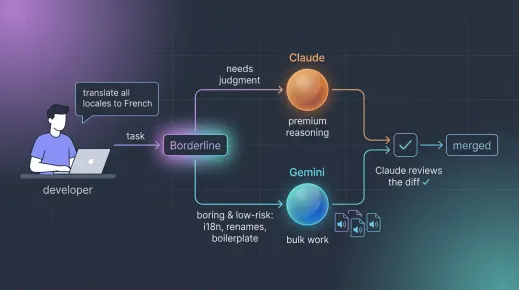
So we built Borderline, an open-source Claude Code plugin that does one thing well: it lets Claude delegate the boring stuff to the Antigravity CLI (agy), then always reviews the result before accepting it. The idea is a transparent Claude ⇄ agy pipeline, where Claude stays reserved for what actually needs thinking, and agy handles the grunt work.
agy --dangerously-skip-permissions) instead. Same transparent pipeline, new engine underneath. See what changed →
Stop Wasting Claude Code on Repetitive Coding Tasks
Modern AI coding workflows lean heavily on a single powerful agent to do everything, from designing a database schema to find-and-replacing a string. That works, but it’s wasteful. A frontier model’s value is its judgment: weighing trade-offs, catching subtle bugs, reasoning about edge cases. When you spend that judgment on “translate this JSON file,” you’re paying premium rates for a commodity task.
Borderline draws a line, hence the name, between two kinds of work:
- • Borderline tasks: mechanical, repetitive, and verifiable at a glance. Being wrong is cheap because you’d catch it instantly. These get delegated.
- • Everything else: business logic, architecture, security, anything ambiguous or where a mistake is costly. These stay with Claude.
The whole plugin is built around classifying a task, deciding if it falls on the safe side of that line, and only then handing it off.
How Borderline Delegates Claude Code Tasks to the Antigravity CLI
Borderline ships as a standard Claude Code plugin with three moving parts: a skill (the brain), a slash command (manual control), and a tiny shell wrapper around the agy binary.
How the Borderline Skill Picks Delegable Tasks
At the core is the borderline skill. It auto-activates when Claude detects a task that smells mechanical, and it follows a strict protocol: classify the task first, pick a mode, run the delegation, and always review the diff before accepting anything. The “always review” step is non-negotiable, it’s what keeps the pipeline trustworthy.
What the skill happily delegates:
- • Bulk translations and i18n (populating
locales/*.json,.pofiles,messages.*) - • Trivial style changes: background and text colors, spacing, CSS token swaps
- • Repetitive renames and replacements across many files
- • Predictable boilerplate, fixtures, formatting, simple copy rewrites
What it refuses to delegate and keeps for Claude:
- • Business logic, algorithms, concurrency, state
- • Architecture, API design, decisions with trade-offs
- • Security, auth, secret handling, data migrations
- • Anything with ambiguous requirements
The rule baked into the skill is blunt: when in doubt, don’t delegate, do it yourself.
Two Antigravity CLI Delegation Modes: --text and --edit
Delegation flows through a single wrapper script, delegate.sh, that exposes two modes depending on how risky the operation is:
| Mode | When to use it | What agy does |
|---|---|---|
--text | Small things: one color, one string, a short translation | Only returns text (agy --print -p, no tools). Never touches files. Claude applies the result. |
--edit | Bulk work: mass i18n, replacements across many files | Works autonomously in the repo (agy --print --dangerously-skip-permissions), reading and writing the named files itself. |
The split matters. For something small, you don’t want agy wandering through your repo, you just want a value back, which Claude then applies cleanly with its own edit tools. In fact, for most translations Borderline prefers --text and pastes the source content inline in the prompt, precisely so agy never has a reason to go scanning the repository. For genuine bulk work across many files, letting agy read and write directly is far more efficient than shuttling hundreds of strings through Claude one at a time.
Here’s what an actual delegation call looks like under the hood:
# Bulk i18n — agy writes the file itself
"${CLAUDE_PLUGIN_ROOT}/scripts/delegate.sh" --edit \
  "Translate ALL keys in locales/en.json and write locales/es.json with the same keys, neutral Spanish, without touching {var} placeholders or HTML tags. Operate only on those two files."

# Tiny change — agy just returns the value
"${CLAUDE_PLUGIN_ROOT}/scripts/delegate.sh" --text \
  "Give me only the hex of a blue 20% darker than #3B82F6. Reply with the value only."
There’s one wrinkle with agy that the old Gemini CLI didn’t have: it’s agentic by default. Left alone, it scans the repository and “explores for context” before doing anything, which is slow and pointless for a one-line color swap. So the wrapper injects a strict preamble that forbids any exploration, forcing agy to do the concrete task and nothing else. On top of that it centralizes all the flags, the model selection, and the mode handling, so the skill never has to remember agy’s quirks. It also keeps the pipeline markers on stderr and agy’s actual output on stdout, so Claude can cleanly separate the result from the noise.
How Claude Code Reviews Every Antigravity Result
This is the part that makes Borderline safe to use. After agy does its thing, Claude verifies before accepting:
- • Diff it.
git diff --statthengit diffon the touched files (orReadthem if it’s not a git repo). - • Sanity-check. For i18n, every key must match the source with none missing or extra, and placeholders must stay intact. For style, the value must be exactly the one requested.
- • Build/lint if a fast check exists (
npm run lint,tsc --noEmit). - • Fix or re-delegate if anything is off. Dubious work never gets through.
Then it reports back in plain language: what got delegated, in which mode, what changed, and what was verified. Something like: “Delegated to agy (--edit) the translation of 142 keys into locales/es.json. Reviewed the diff: keys aligned with en.json, placeholders intact, lint OK.”
That transparency is the whole point. You always know what was handed off and what was checked.
How to Use the Borderline Claude Code Plugin
Borderline works both automatically and manually.
Automatic: just ask Claude for something borderline in natural language and the skill kicks in on its own:
“Translate the locales to French.”
“Switch the dashboard background to dark mode.”
Manual: use the slash command when you want to force a delegation explicitly:
/borderline translate locales/en.json to locales/de.jsonOr just tell him “use borderline” in your prompt and the skill will take over.
How to Install Borderline in Claude Code
Borderline installs like any Claude Code marketplace plugin:
# Inside Claude Code:
/plugin marketplace add BansheeTech/Borderline
/plugin install borderline@borderline-marketplace
Two requirements:
- The Antigravity CLI (
agy) installed, signed in, and on yourPATH(agy --help). Note it can’t be installed unattended, the CLI needs you to sign in to your Google account first. - Claude Code launched with
--dangerously-skip-permissions:
claude --dangerously-skip-permissionsThat last flag is what keeps the pipeline transparent. Without it, every single agy call would prompt for confirmation and the whole “delegate and move on” flow falls apart. The trade-off is real, so use it in a workspace where you trust the tasks being run, which is exactly the kind of low-risk, verifiable work Borderline is designed to delegate in the first place.
Why We Built a Claude Code to Antigravity Pipeline
We work with Claude Code daily across HomeDock OS and our other projects, and we kept noticing the same pattern: a huge chunk of agent time was being spent on tasks that were boring but not hard. Mass-translating UI strings. Nudging colors. Renaming things. Work that any competent model handles fine, but that we’d rather not spend our reasoning budget on.
Borderline is our answer. It’s not trying to be clever. It’s a deliberately small, transparent tool that draws a clear line between work that needs a brain and work that needs hands, and routes each to where it belongs. Claude stays focused on judgment. agy takes the repetitive load. And nothing ships without a review.
It’s open-source under the MIT license and available now on GitHub. If you live in Claude Code and you’re tired of watching your best model translate JSON files, give it a try.
And while Borderline delegates to the Antigravity CLI today, the architecture is backend-agnostic by design. If you’d rather offload to a different engine, feel free to submit a pull request to add support for OpenCode, Ollama, Codex, or whatever else you run. Contributions are more than welcome.
Update — Borderline Now Runs on the Antigravity CLI (June 2026)
When we first shipped Borderline, the boring work went to the Gemini CLI. As of June 2026 Google deprecated that CLI, so the original gemini binary is on its way out. Rather than let the plugin rot, we moved the whole pipeline over to its successor: the Antigravity CLI (agy), Google’s new agentic command-line tool.
For you, almost nothing changes. The economics are identical: agy still runs Gemini models under the hood (Borderline defaults to Gemini 3.5 Flash (High)), so the boring, repetitive work still lands on a cheap, fast model while Claude keeps its reasoning budget for what matters, and still reviews every result before accepting it. The skill, the /borderline command, and the two --text / --edit modes all work exactly as before.
There is one real behavioral difference worth calling out. Unlike the old gemini CLI, agy is agentic by default: left alone, it scans your repository and “explores for context” before doing anything, which is slow and completely pointless for a one-line color swap or a JSON translation. So delegate.sh now injects a strict preamble that forbids any exploration, forcing agy to do the concrete task and nothing else. As long as you always go through the wrapper you never notice this, but it’s why the --text path, paste the source inline and get the result back, is now the preferred mode for translations: there’s simply no repo for agy to wander into.
The commands changed accordingly under the hood, --edit now runs agy --print --dangerously-skip-permissions and --text runs agy --print -p with no tools, and the install requirement is the Antigravity CLI instead of the Gemini one (note it needs you to sign in before it’ll work, so it can’t be installed unattended). A handful of new environment variables, BORDERLINE_MODEL, BORDERLINE_TIMEOUT, BORDERLINE_CLI and BORDERLINE_TEXT_SKIP_PERMS, let you tune the model, the timeout, and the binary if you need to.
And the backend-agnostic point from above still stands, only more so: if Google deprecating a CLI taught us anything, it’s that you shouldn’t be locked to one engine. The pipeline is the valuable part. If you’d rather route the boring work somewhere else entirely, the pull request door is still open.
Related Links