Negative SEO? Okay, a Free Google Disavow Tool for Bad Links
Technical analysis of a massive negative SEO attack against our domain using AWS-based and PBN link farms, and how we built Disavow Generator to fight back

This January 2026, our team noticed something strange in our Google Search Console. Our backlink profile was exploding, but not in a good way. What started as a trickle of suspicious links quickly became a flood, an asburd flood. By the time we fully analyzed the situation, we had identified 1,956 malicious backlinks pointing to our domain from a coordinated negative SEO attack.
Instead of just defending ourselves and moving on, we built an internal defense tool and turned it into an open-source weapon that anyone can use. This is the technical breakdown of what happened, why we were prepared to fight back, and how you can protect yourself too.
Update — March 2026: The attack nearly tripled. 5,058 disavow entries, subdomain carpet-bombing, and Googlebot-blocking techniques. Jump to the latest →The Anatomy of a Negative SEO Attack
Negative SEO is a black-hat technique where attackers build thousands of low-quality or spammy backlinks to a target website. The goal? Make Google think you’re engaging in link manipulation schemes, triggering algorithmic penalties or manual actions that tank your search rankings, it makes sense now because at this moment we were ranking well for competitive keywords, getting almost 1 million organic impressions with zero marketing spend.
Our legitimate backlink profile, built since the beginning, included links from universities, newspapers, government institutions, and technology publications, all natural, organic and legit. The attackers knew exactly what they were doing, they wanted to drown our quality links in a sea of toxic spam. They succeeded in generating nearly 2,000 spammy backlinks in just a few weeks but rankings almost haven’t changed because our technical team did an awesome coordinated job.
Here’s what the attack looked like by the numbers:
| Category | Count | Percentage |
|---|---|---|
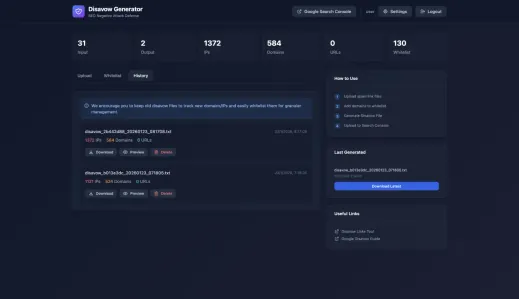
| Malicious IPs | 1,372 | 70.1% |
| Spam Domains | 584 | 29.9% |
| Specific URLs | 0 | 0% |
| Total Entries | 1,956 | 100% |
The attackers used domain-level, PBNs and IP-level spam, meaning they weren’t targeting specific pages, they were carpet-bombing our entire domain with toxic associations. It’s a dirty but very real tactic where competitors try to destroy your Google rankings: they buy thousands of toxic backlinks pointing to your domain, links from spam, malware, gambling sites and so on to name a few.
Google detects “suspicious” link patterns, your domain gets penalized or banned, and you disappear from search results. It’s the digital equivalent of someone dumping trash in your garden so the city fines you. You didn’t do anything wrong, but you’re the one who has to clean it up and prove your innocence.
Technical Analysis: Following the Digital Fingerprints

When we started analyzing the malicious links, clear patterns emerged. This wasn’t a random spam campaign, it was a sophisticated (yet dumb), infrastructure-backed attack.
Pattern 1: AWS as the Attack Platform
70% of the attack came from Amazon Web Services IP addresses. The attackers spun up ephemeral EC2 instances across multiple AWS regions to generate links: 13.208.161.223, 18.141.178.49, 52.221.184.85, 54.251.129.127, ec2-35-178-5-236.eu-west-2.compute.amazonaws.com…
We identified links from at least 15 different AWS regions, including ap-south-1 (Mumbai), eu-west-2 (London), us-east-1 (N. Virginia), ap-northeast-1 (Tokyo), sa-east-1 (Sao Paulo)… This geographic distribution makes the attack harder to block and suggests a well-funded operation using cloud infrastructure to mask their origins.
Pattern 2: Algorithmically Generated Domain Names

The domain-based attacks showed clear algorithmic generation patterns. These weren’t real websites, they were spam farms created specifically for link manipulation.
Concatenated Dictionary Words: Domains combining random dictionary words like [randomword][randomword][randomword].com or .forum. A classic spam technique to generate infinite “unique” domains cheaply.
Blogspot Spam Networks: Over 100 Blogspot subdomains following the pattern [prefix][randomchars].blogspot.com. Google’s own platform being weaponized for SEO attacks.
Pattern 3: City-Named SEO Attack Domains
The most interesting pattern was a network of 99+ domains following the schema [seo-keyword]-[major-city].[tld], registered across multiple cheap TLDs (.online, .site, .space, .website). Beijing, Tokyo, Mumbai, Lagos, Moscow… every major world city had multiple domain variations. This is clearly a commercial negative SEO service advertising its purpose in the domain name itself.
Pattern 4: Suspicious TLD Distribution
The attack heavily favored new and cheap TLDs that are commonly associated with spam:
| TLD | Count | Notes |
|---|---|---|
.forum | 89 | Non-standard, cheap TLD |
.live | 47 | Frequently abused |
.wtf | 23 | Low-trust TLD |
.garden | 12 | Uncommon, cheap |
.tattoo | 11 | Very unusual for legitimate sites |
.work | 8 | Mixed reputation |
These newer TLDs, while legitimate, are frequently exploited by spammers due to their affordability.
The Solution: Our own Disavow Generator Tool
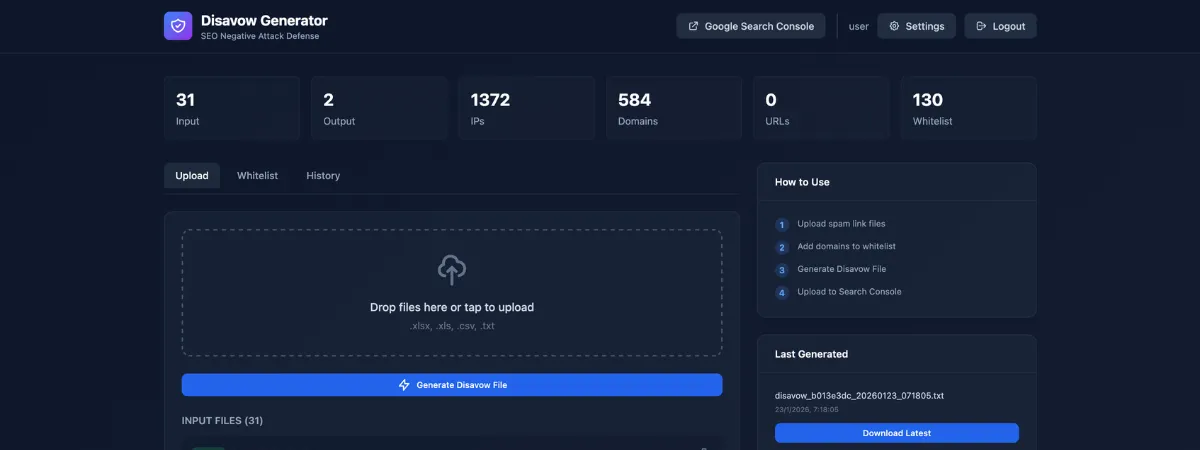
Initially, we built an internal command-line tool to process backlink exports and generate disavow files. It worked well for us, but we realized something: this attack could happen to anyone, and most webmasters can’t realistically review 2,000 links manually to separate the toxic from the legitimate, then manually build the disavow file in Notepad or similar. That’s simply not feasible.
So we built a GUI over it, containerized it with Docker, released it under the AGPLv3 license, and added it to our own App Store for free. Disavow Generator is now available for everyone in the HomeDock OS App Store. Thanks to this attack, our cloud operating system gained a brand new use case for the community.
Key Features
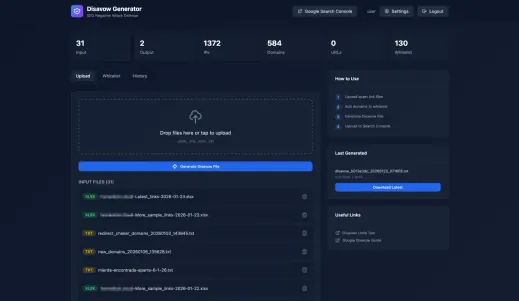
Automated Disavow Generation: Upload backlink exports from tools like Ahrefs, SEMrush, Majestic or even Google Search Console exports in Excel format. The tool automatically categorizes entries as IPs, domains, or specific URLs and generates a Google Search Console compatible disavow file.
Smart Categorization: The tool distinguishes between:
- • IP addresses (direct server links)
- • Domain-level blocks (entire websites)
- • Specific URL blocks (individual pages)
Historical Tracking: Every disavow you generate is tracked. When new links or attacks arrive (and they will), the tool highlights only the NEW threats, so you’re not reviewing the same entries repeatedly.
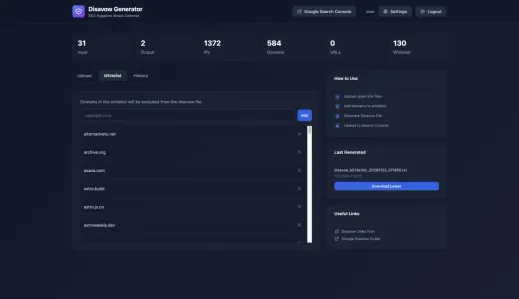
Whitelist Management: Protect your legitimate backlinks. Add trusted domains to your whitelist, and they’ll never appear in your disavow suggestions, even if they show up in your backlink reports over and over.
New Entry Review: Before blocking anything, review new domains and IPs. Found a false positive? Add it to your whitelist with one click.
Downloading and Getting Started with our Disavow tool
The fastest and easiest way to get it running is through HomeDock OS by using Disavow Generator from the App Store. Just download and install HomeDock OS, open the App Store, search for “Disavow Generator”, and click Install. Done. No terminal, no configuration, no hassle, and free updates forever while keeping your data.
For those who prefer standalone deployment, the tool is also available on GitHub at https://github.com/BansheeTech/Disavow-Generator with Docker support included.
user / passwd. Change them immediately via Settings.
How to Use the Generated Disavow File

Once you’ve processed your backlinks and generated a disavow file, here’s what to do:
Step 1: Download the generated .txt file from Disavow Generator.
Step 2: Go to Google Search Console Disavow Tool.
Step 3: Select your property and upload the file.
Step 4: Wait. Google takes weeks to process disavow files. This is not instant protection, it’s a formal request to ignore these links.
Step 5: Monitor your Search Console for manual actions or ranking changes.
Important Considerations
Disavow files are cumulative. Each upload replaces the previous one. If you’re adding new entries, make sure your new file includes all previous entries plus the new ones. Disavow Generator handles this automatically through historical tracking.
Don’t over-disavow. Blocking legitimate links hurts your rankings. Always review entries before generating the final file. Use the whitelist feature to protect known-good domains.
Regular monitoring is essential. Negative SEO attacks often continue for months. Export your backlinks weekly, process them through Disavow Generator, and upload updated files as needed.
Lessons Learned
After defending against this attack, here’s what we now know:
Cloud infrastructure is weaponized. AWS, Google Cloud, and Azure are commonly used for negative SEO because instances can be spun up and destroyed quickly, leaving no permanent trace.
Attack patterns are predictable. Once you identify the signatures (algorithmic domain names, specific TLD preferences, regional IP patterns), you can build automated defenses.
The SEO industry has a dark side. There are people making money selling negative SEO attacks as a service, because there are people willing to pay to destroy competitors’ (👀) rankings instead of improving their own.
Documentation matters. Keep records of when you first noticed the attack, what analysis you performed, and when you submitted disavow files. If you ever need to file a reconsideration request with Google, this documentation is essential.
The Bigger Picture: Taking Control
Negative SEO exists because the link graph is a powerful ranking signal that’s difficult to verify. Until Google develops better detection for these attacks, webmasters must defend themselves.
We built Disavow Generator because we believe in practical tools over theoretical advice. You can read a hundred articles about negative SEO, but when you’re facing 2,000 malicious links, you need software that processes the data and gives you a solution.
The tool is open source. Fork it, improve it, adapt it to your needs. If you build something cool, send us a pull request.
The attacker’s goal was to damage our search visibility. Instead, we turned their attack into:
- • A detailed technical analysis for the community
- • An open-source tool helping other victims
- • Content that attracts exactly the audience we want to reach, more use cases for HomeDock OS
To whoever orchestrated this attack: thank you for the motivation. :)
Disavow Generator is licensed under AGPLv3 and available now on GitHub - Disavow Generator, throw a star over it!

Update — The negative SEO attack as of March 2026
The original version of this post documented 1,956 malicious entries. That number is now 5,058. The attack didn’t stop, it escalated to nearly three times its original scale, and the infrastructure behind it evolved. Here’s what changed.
Current numbers
| Category | Jan 2026 | Mar 2026 | Growth |
|---|---|---|---|
| Malicious IPs | 1,372 | 4,175 | +204% |
| Spam Domains | 584 | 883 | +51% |
| Total Entries | 1,956 | 5,058 | +159% |
The IP-based attack scaled massively. The attackers continued spinning up AWS EC2 instances across 15+ regions, adding thousands of new IPs to their rotation. Domain-based spam grew steadily too, with new waves of algorithmically generated blogspot subdomains and cheap-TLD spam farms joining the party. Each entry in the disavow file represents a source generating between 3 and 5 toxic backlinks on average, that’s roughly 40,000 spam backlinks pointed at our domain in less than two months. Good joob my bwoy!
Subdomain carpet-bombing
Starting around February 2026, the attackers expanded their strategy beyond homedock.cloud. They began targeting subdomains we don’t fully control:
- • status.homedock.cloud (hosted by UptimeRobot) — ~12,000 spam backlinks
- • docs.homedock.cloud — ~12,000 spam backlinks
- • dashboard.homedock.cloud — ~12,000 spam backlinks
Each subdomain received roughly the same volume, suggesting a fully automated campaign hitting every publicly visible subdomain. The logic is straightforward: if the main domain’s disavow file protects homedock.cloud, the attackers try to poison subdomain signals separately. Smart. Not smart enough.
Googlebot-blocking: hiding in plain sight
The spam infrastructure got more sophisticated. The attack sites now actively block Googlebot and human visitors. Visit one of these domains and you’ll get a 403, a timeout, or a redirect to garbage content. But when Google’s indexer crawls the page at the right moment, the spam links are visible.
This makes manual verification nearly impossible. You can’t visit the linking page to confirm it’s spam, the attackers specifically prevent that. They control when and to whom the toxic links are shown, which is designed to slow down anyone trying to manually audit their backlink profile.
Links are served on non-standard ports (:1000, :8080, :8880) hosting adult and piracy content, another layer designed to make the association as toxic as possible for the target domain.
How we responded to the escalation
We deployed a modified version of Disavow Generator on a remote server in Hong Kong that connects directly to a reading authorized Google Search Console account. Every time new backlinks appear, it detects them automatically and sends us an email alert. We review the new entries, update the whitelist with a few clicks if needed, and the disavow file is resubmitted. The entire process takes about 30 seconds. The attack that was supposed to drain our time and resources now costs us less effort than reading the spam itself.
And the most important thing: No manual action from Google, rankings stable. The early and aggressive disavow work from January paid off. Despite the attack nearly tripling in scale, our search visibility hasn’t been materially impacted.
Reference disavow file
We’re making our production disavow file available as a reference so you can see what a real-world, large-scale negative SEO defense looks like in practice.
View reference disavow file (5,058 entries — March 2026)
Image Gallery
Related Links